The GameCube controller has maintained its cult status across three decades, defying the industry’s shift toward standardized button layouts. Whether you’re hunting for one to play original GameCube classics, competing in Super Smash Bros. Melee, or exploring the new Nintendo Switch 2 wireless variant, understanding what sets this controller apart from modern alternatives is essential. This guide covers everything from its distinctive ergonomics to compatibility across Nintendo systems, helping you choose the right version for your setup and gaming goals.
Key Takeaways
- The GameCube controller’s asymmetrical button layout, octagonal control stick gate, and ergonomic design remain unmatched for competitive Super Smash Bros. Melee and original GameCube gameplay.
- Original wired GameCube controllers require an adapter to work on Nintendo Switch, with trade-offs including missing system buttons and potential latency issues.
- The new wireless Nintendo GameCube Controller – Nintendo Classics for Switch 2 eliminates compatibility pain points by adding Bluetooth connectivity, USB-C charging, and motion controls.
- GameCube controllers excel in specific use cases: native GameCube and Wii libraries, competitive Smash tournaments, and speedrunning where the original input method is essential.
- Regular maintenance of the control stick, triggers, and cables—along with proper storage in cool, dry conditions—extends your GameCube controller’s lifespan across Nintendo generations.
What Makes The GameCube Controller Stand Out From Modern Controllers
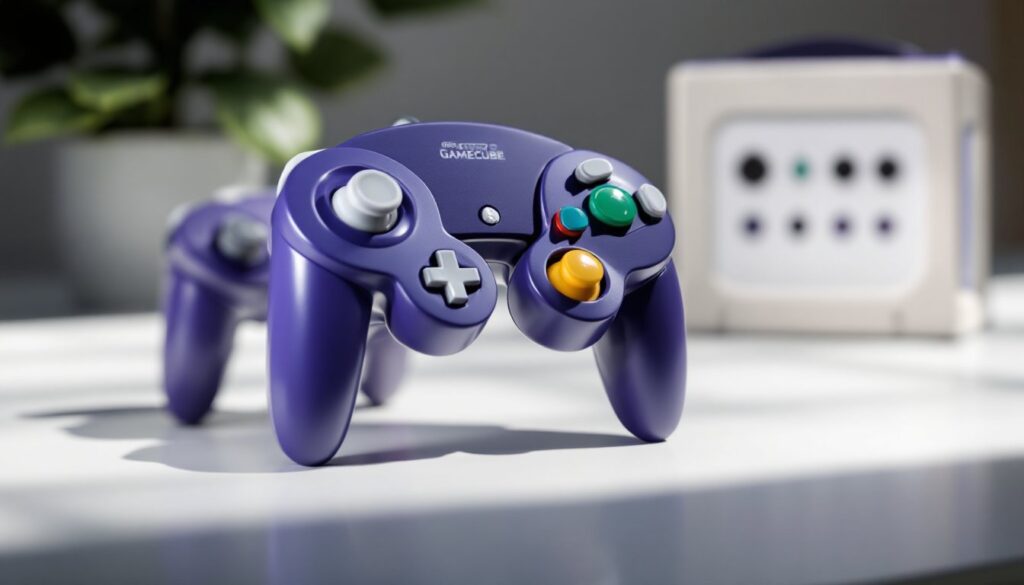
The GameCube controller’s design breaks the mold of symmetrical modern pads. Its button layout features a large central A button, smaller B button, and kidney-shaped X/Y buttons arranged asymmetrically, a stark contrast to the diamond layouts found on most contemporary controllers, including the Switch Pro Controller and Nintendo 64 controller predecessors.
The analog triggers (L and R) are dual-stage, offering both a continuous analog pull and a digital click when fully pressed. This design shines in racing games and pressure-sensitive titles where gradual input control matters as much as precision.
The octagonal control stick gate is one of the most celebrated features for competitive players. The notched design helps lock in consistent angles, a trait that made the GameCube controller the de facto standard for Super Smash Bros. Melee competitors. The C-stick, a small yellow secondary stick, handles camera control and quick inputs without demanding the right thumb leave the main stick.
Ergonomically, the controller prioritizes right-hand dominance. Button placement, grip contours, and overall weight distribution favor extended gaming sessions. Many players find it more comfortable than modern symmetric designs, particularly for GameCube-era action and platformer titles where the controller’s shape feels intentional rather than generic.
Compatibility: Using Your GameCube Controller Across Nintendo Systems
The GameCube controller’s journey across Nintendo hardware reveals both strengths and limitations.
Native Support: Original GameCube hardware recognizes the controller immediately. On the original Wii, GameCube ports allow full compatibility with many Wii and GameCube titles, though the Wii Mini lacks these ports entirely.
Wii U & Switch: Things get complicated here. Wii U support is limited to specific titles, primarily Super Smash Bros. for Wii U, via the official Wii U GameCube Controller Adapter. On Nintendo Switch and Switch OLED, you’ll need the same adapter (or licensed third-party alternatives) to connect a wired original controller, but functionality is restricted, no motion controls, Home/Capture buttons, or minus functionality.
Nintendo Switch 2: This is where the story shifts. Nintendo released the wireless Nintendo GameCube Controller – Nintendo Classics, a fresh take on the original design. Unlike the wired originals, this version connects directly to Switch 2 via Bluetooth-style wireless with USB-C charging. It includes extra top-edge buttons (Sync, Home/Capture, GameChat, and indicator LEDs) and supports motion controls, making it a more complete modern peripheral. But, it only works with Switch 2, not backward-compatible with the first Switch.
Nintendo Switch Support and Adapter Options
Using original wired GameCube controllers on Switch and Switch OLED requires the official Nintendo GameCube Adapter (originally designed for Wii U) or compatible third-party equivalents. The trade-off is significant: no vibration in some games, no system button remapping, and missing inputs that certain titles expect. For competitive Smash Ultimate players, the controller itself is ideal, but adapter latency and button limitations frustrate some users.
The Switch 2 wireless controller eliminates these pain points for Switch 2 owners. It supports motion controls for games that require gyro input and functions as a standard controller in most titles, though button limitations (missing ZL and minus button) may restrict compatibility in future releases. Nintendo confirmed that the, though it works more broadly across the system.
Original vs. Modern Variants: Which GameCube Controller Should You Buy
Choosing between GameCube controller variants depends on your hardware and use case.
Original Wired Controllers (DOL-003 & Reissues)
These remain the gold standard for GameCube hardware and competitive Melee players. Pros: zero latency, authentic feel, durable construction. Cons: no wireless, no motion controls, no system buttons, and stick wear over time. If you’re playing original GameCube games or competing in Melee on GameCube or Wii, originals are unmatched.
Wii U/Switch “Super Smash Bros.” Editions
Functionally identical to originals but marketed toward Smash players. They work fine on Switch via adapter but suffer the same button limitations as older wired models.
Switch 2 “Nintendo GameCube Controller – Nintendo Classics” (Wireless)
This is the future of the form factor. Pros: wireless connectivity, USB-C charging, built-in motion controls, integrated system buttons, and broad compatibility on Switch 2. Cons: exclusive to Switch 2, lacks full modern button sets (no ZL or minus), and potential rumble limitations in some games. It’s the best choice if Switch 2 is your primary platform.
Third-Party GameCube-Style Controllers
Brands like NYXI offer Bluetooth pads with modern features, Hall effect sticks, macro buttons, extra inputs. Trade-offs: feel differs from originals, latency varies, and compatibility depends on the specific device. Most support Switch or Switch OLED but won’t work across the full Nintendo ecosystem. Check pro player settings and configurations to see what competitive players are actually using: originals and the new Switch 2 wireless still dominate esports.
Top Use Cases: Gaming, Speedrunning, and Competitive Play
The GameCube controller excels in specific scenarios where its design becomes an advantage, not a novelty.
GameCube & Wii Libraries
Native or near-native support makes originals essential for authentic play. Action games, platformers, and racing titles were designed around this controller’s layout. Emulation on Switch or other platforms can’t fully replicate the original experience without an appropriate controller.
Super Smash Bros. Series
Melee on GameCube or Wii remains the competitive standard: the octagonal stick gate and button layout are integral to frame-perfect combos and tech. Smash for Wii U and Ultimate on Switch see widespread use of GameCube controllers via adapter, especially among players with years of Melee experience. The familiarity factor is enormous, switching to a different pad destabilizes muscle memory.
Speedrunning
Many GameCube and Wii speedrunners swear by the controller for consistency and control. Games like Metroid Prime and The Legend of Zelda: Twilight Princess feel natural with the original input method. Speedrunning communities often test multiple controllers, and originals frequently rank highest for reliability.
NSO Nintendo GameCube – Nintendo Classics (Switch 2)
Nintendo designed button remapping within the Classics app for per-title optimization, making the Switch 2 wireless controller ideal for NSO library exploration. It bridges retro gaming and modern convenience, though future game compatibility will depend on Nintendo’s support.
Maintenance and Care Tips For Long-Lasting Performance
GameCube controllers are hardy but need basic care to avoid degradation.
Sticks
The control stick is the most vulnerable component. Avoid slamming the stick against the octagonal gate: rotate gently within its range. Dust accumulates around the base, use dry cotton swabs or lightly isopropyl alcohol-dampened swabs to clean. For aging originals with stick drift, internal replacement by a qualified technician can restore function, though it’s labor-intensive.
Buttons & Triggers
Keep the controller free of liquids and dust. If analog triggers feel inconsistent or sticky, professional cleaning or internal repair may help, but replacement often proves more cost-effective for aging hardware.
Cables (Original Wired Models)
Avoid sharp bends and pulling from the connector itself, grip the plug when unplugging. Coiling the cable loosely prevents internal wire damage.
Wireless Models (Switch 2 & Third-Party Bluetooth)
Use manufacturer-recommended USB-C cables for charging. Avoid extreme temperatures, which degrade battery longevity. Some third-party controllers receive firmware updates, keep them current for compatibility improvements.
Storage
Store in a cool, dry place. Don’t stack heavy objects on triggers or sticks, which can cause permanent deformation. If storing long-term, charge wireless controllers every few months to maintain battery health.
Conclusion
The GameCube controller remains unmatched for original GameCube and Wii gameplay, competitive Melee, and speedrunning where its distinctive layout and feel are essential. Wired originals deliver zero latency and authenticity, though adapters are required for Switch compatibility. The new Nintendo GameCube Controller – Nintendo Classics brings the design into the wireless era for Switch 2, adding motion controls and system buttons while maintaining the iconic ergonomics. Regardless of which variant suits your needs, proper maintenance, cleaning sticks, protecting cables, and managing storage, extends its lifespan across Nintendo generations. Whether you’re hunting the best GameCube games on Nintendo Switch or competing at the highest level, the GameCube controller proves that thoughtful industrial design transcends time.